
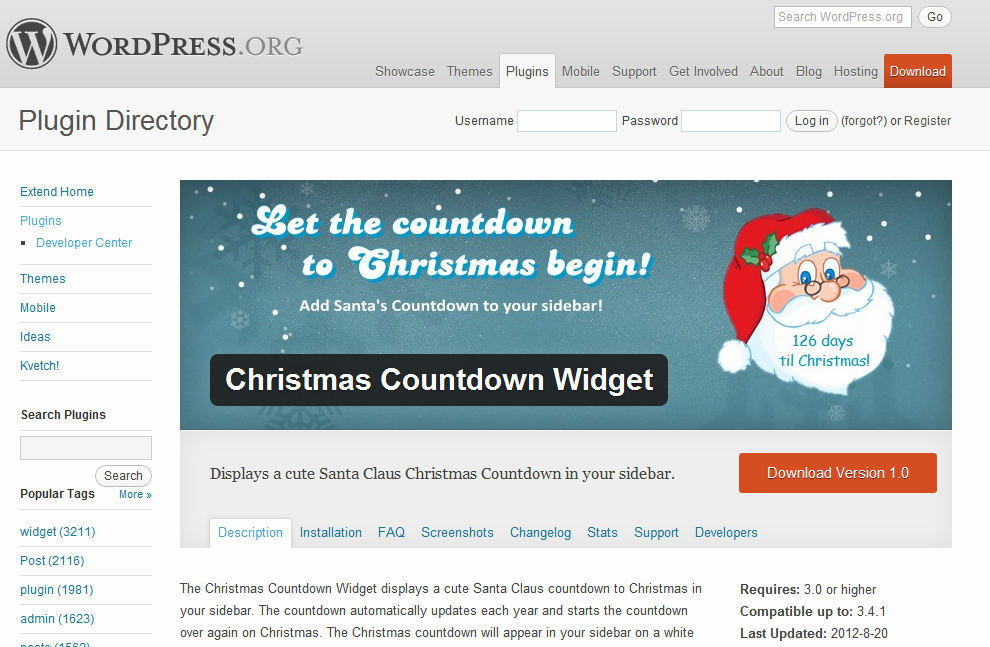
 We are super happy to announce the release of our first WordPress plugin, Santa’s Christmas Countdown Widget.
It’s never too early to let the Countdown to Christmas begin! Download the plugin from the WordPress plugin repository to add a cute Santa Claus inspired Countdown to Christmas in the sidebar of your blog.
Santa’s countdown never needs updated!
When the countdown reaches Christmas day, Santa’s Countdown will display a ‘Merry Christmas’ greeting to your visitors. Santa starts his countdown again on the day after Christmas day, every year.
New: Use Santa’s countdown on any post or page!
To place the countdown on a post or page, you must first have the plugin installed. Then, use the shortcode [countdown] in your post. This will display the countdown to the left of your text. Use the shortcode [countdown-right] to display the countdown aligned right of your text.
Installation and Screenshots
- Upload plugin and install. You can install through your WordPress admin panel.
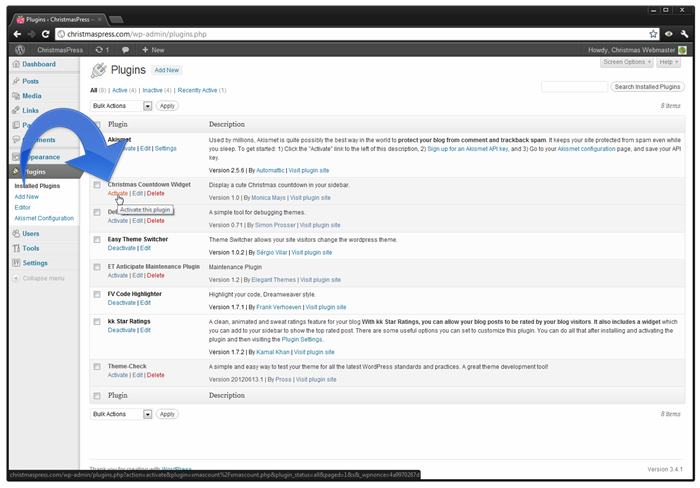
- On the plugins panel activate the Christmas Countdown Widget.
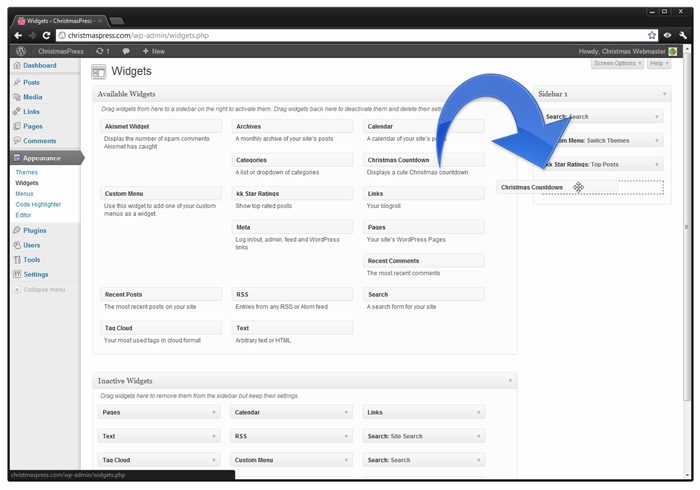
- In the widgets menu drag the Christmas Countdown Widget to your sidebar.
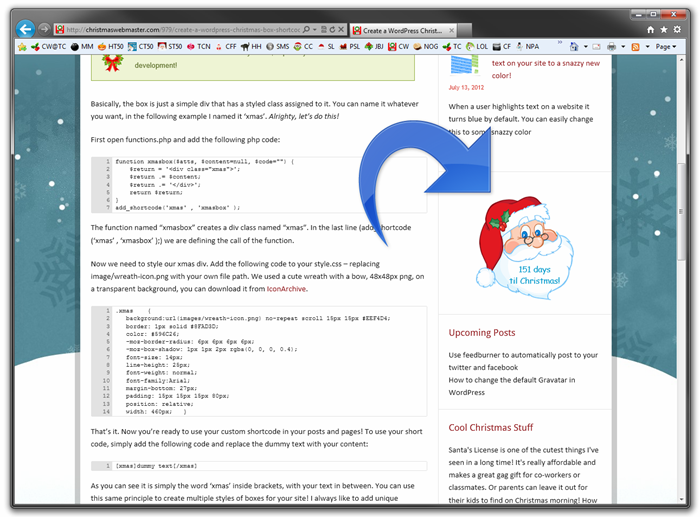
- The Christmas Countdown Widget displays a cute Santa countdown in your sidebar!
- Since v2 – use the shortcode [countdown] to display the countdown on any page or post.
 |
 |
 |
 |
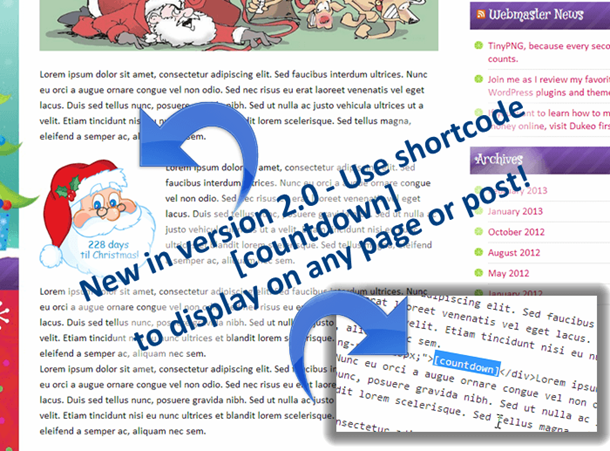
New in version 2 – use shortcodes!!
Love the plugin? I would love to hear from you in the comments…
Awesome! Thank you *SO* much for today’s donation… you know who you are! It really made my day =D
Would not it be nice…. if you could change the text to another language?
Examples of Swedish called the “dagar till julafton”.
Note – we do not expect to Christmas Day, but the day before.
Santa Claus will be in the evening at around 6-7 pm
Hi Paul, thanks for stopping by. You can feel free to edit the plugin’s countdown date and language output.
Go to Plugins > editor > santas-christmas-countdown/xmascount.php
find this line:
change to:
Locate the two instances of:
and change to:
BigDay = new Date(\”December 24, \”+thisyr);
I hope this helps!
Pingback: Nettes Plugin: Weihnachten | Meine Testfamilie
Hey there
Great plugin!
A quick question. When I leave the title blank the title bar still shows with no entry. Is there some way around this or is this a theme issue. Other plugins on the theme don’t show the ‘blank’ title.
Any advice would be appreciated.
Hi Eugene,
I’ve had the same issue in a theme I am developing, but I use the plugin on other themes, and the title bar doesn’t show.
Anyhoo, you can remove the following lines from xmascount.php, and the title bar shouldn’t show up in your theme =D
Go to Plugins > editor > santas-christmas-countdown/xmascount.php
echo $before_widget;
    $title = empty($instance['title']) ? ' ' : apply_filters('widget_title', $instance['title']);
    if (!empty($title))
      echo $before_title . $title . $after_title;;
It should remove the title bar completely.
Hope this helps…
Hi. Merry Christmas. I think there is a problem with the plugin.
I am using WordPress 3.5 and latest Chrome browser and I can’t see the second line of the widget. In Internet Explore is O.K.
example:
4 days til
Christmas
“Christmas” isn’t show in Chrome.
Thanks for your time.
Hi Nicolas,
Merry Christmas to you, too!
I’m using the plugin on several sites and have checked and re-checked, I can find no conflicts with the plugin and chrome, or the plugin and WordPress 3.5.
Have you edited the plugin in any way? I ask because in your example you say:
“4 days til
Christmas”
But it should show as
“4 days
til Christmas”
It seems like there is a missing line break, and perhaps the “Christmas” is just out of view. If you could leave me a link to your site, I would be happy to take a look for you.
Thanks =D
Pingback: Santa Claus Christmas Countdown Widget
Thank you for today’s donation!! I really appreciate it!
Hi:
I have version 2.0 in wordpress. It says it’s active, but it doesn’t show up on my website. I drag it over to the side in the wp editor, says it’s active, but then when I go to the website, it’s not there. Then, when I go back to the plugin page for WP, it’s not on the right sidebar any more. I hope that makes sense. Any ideas? Thanks in advance,
JK
And, I uninstalled and reinstalled. No difference. Thanks…
Are you using the latest version of WordPress? I’ve tested the plugin with several versions of WP, including the latest, and I can’t replicate the issue.
All I can think of is perhaps the visibility isn’t set correctly?
{see screenshot above}
Hi,
I wonder if there is a way to disable the new shortcode feature. We had your excellent timer on our site as a sidebar countdown and it worked great.
Unfortunately, the shortcode [countdown] is already used by another plugin we use to schedule daily content. It is conflicting.
Maybe you have a link to the old plugin? Or maybe I can change the shortcode to [countdown-something-else]
Hi there, no problem. I made a version just for you. I changed the shortcode to [santas-christmas-countdown]
Here ya go: https://christmaswebmaster.com/wp-content/uploads/2013/11/santas-christmas-countdown-reloaded.zip
Delete the old version and upload the new version. Let me know if that works, if not I can remove the shortcode completely.
Oh, thanks so much! It’s working great now. http://www.visitwithsantaaz.net/santas-helpers-corner/the-cinnamon-bear/
You’re welcome, merry Christmas 🙂
Just installed on clients website. Even tho it is the Dec 1 here in Aus, countdown is off by a day. Should be 24 days not 23. Also my widget looks nothing like yours. Thanks
Could you send me a link so I can see it?
http://www.suncountry.com.au/contact-us
Ideally I wish to use the shortcode on home.
could you send me a screenshot? It must be a browser issue… I have checked it in the latest version of Opera, Chrome, FireFox, and IE – works perfectly on your site for me.

Clearly my side. I’m seeing yours as 23 also.
Hmmm even on iPhone it shows 23.
Time Zone issue ?
That is what I would guess. It looks like the countdown is synch’ing with the server and not your local machine’s time zone.. not sure why.
Ruling out a server issue. Hosting is in the US & some parts have not long clicked over to the 1st Dec while rest still 30 Nov. So plug in should be showing 24 or 25. And I’m see 23 here. Have checked time zone settings for hosting & site. Set to correct time zone.
Plugin version 2.01
WP 3.7.1
Have just tried putting this in the sidebar on my site and the ’23 days til Christmas’ is showing on his hat rather than in his beard. Any ideas? Thanks.
It looks like a CSS conflict.. are you using the latest version of WordPress and the plugin? I think it may be a theme conflict.. you could add a few pixels to the padding in the CSS file to offset whatever is going on. Let me know if you need help 🙂
Merry Christmas!
Pingback: WordPress Plugins To Prepare Your Site For Christmas | RichInfoWorldRichInfoWorld
Pingback: Tổng hợp những plugin giúp bạn chuẩn bị Noel trong WordPress
Pingback: Christmas: Trang trí blog đón Giáng Sinh với Christmas Plugin
Thanks for the advice Monica. Is there any easy way to change the text color of the ‘days til Christmas’ bit just so it’s a bit clearer, rather than me mess about with padding etc.?
It definitely looks like something conflicting on your page. I also see empty <> angle brackets at the top of your page where it appears there is an error in your code.
To change the font color you will still need to mess with the stylesheet of the plugin. You will need to edit this line:
If you would like me to take a look, I’d be happy to help. You can email me directly at jing at christmaswebmaster.com
Pingback: Plugin WordPress Untuk Sediakan Tapak Anda Untuk Krismas - Berita Malaysia
I am also having issues with the countdown calculation. Today it was showing 9 days until Christmas when it is actually 10. Even if it was pulling server time (UTC + 0), it still should have been 10 days at 11:00 pm UTC (5:00 pm CST) on December 15th. Not sure if it is pulling wrong time or an actual wrong date and I don’t know enough about the programming to figure that out myself.
Using version 2.0 of the plugin
I answered my own question after a crash course in programming.
The javascript file is using the Math.floor() command which returns the integer value of a number (rounded down).
e_daysLeft = timeLeft / msPerDay;
daysLeft = Math.ceil(e_daysLeft);
So if e_daysLeft comes out to 9.5 for example (9 days 6 hours), the Math.ceil command gives you a value of 9.
So if it is December 15th at 6 pm, there is technically 9 days and 6 hours remaining but the Plugin is going to show only the 9 days. 9 days from the 15th would be the 24th, not the 25th.
I changed the javascript to usethe Math.ceil() command which rounds the value up. In my example, it would return 10 days which is correct strictly from a calendar day perspective.
my bad… I posted the corrected code. The original uses the Math.floor() command and I replaced it with the Math.ceil() that you see in my previous post.
Feel free to clean up and combine these as needed if they are helpful.
Oh NO! I just realized that I never replied to you, Tim. THANK you SO much for your edit to the plugin. I updated the script and updated the plugin.. It works perfectly now 🙂
Hi there! Will you be making this with a picture other than Santa? Like a tree, or stocking, etc.?
Thanks!
Sure will! I’ve got several new designs coming for 2014 🙂
Pingback: The 5 best Christmas countdown widgets for your website | MotionBump Reader
Pingback: The 5 best Christmas countdown widgets for your website - Responsive Joomla and Wordpress themes
Any way to make it get down to minutes, seconds even?
Would love to learn how and do it myself 🙂
Pingback: 5 widget đếm ngược đến Giáng Sinh tốt nhất cho thiết kế web | vivicorp
Pingback: Christmas Countdown Widget » FindScripts
Pingback: 10 Awesome WordPress Plugins to Prepare Your Website for Christmas - WDT WebDzineTech
Pingback: 20 free WordPress plugins To Prepare Your Site For Christmas
Hi! Is there any way I could use this for a free wordpress sight via html code?
Thanks!
Hi, Great little plugin but doesn’t seem to have been updated for wordpress for over two years 🙁 any signs of update to show compatibility with wordpress 4.6.1?? if it is ok you only need to update the plugin site to show latest compatability. seems a shame if no longer supported.
It works with the latest version – I just updated the version number in the repo 🙂
Great, thanks, just added.
Now all i need you to do is whip up a festive advent calendar for wp.
All the best.
Ahhh, that could be a fun project – I’ll add it to my list for next season. 🙂
Hi, I’m a teacher. Can this be used for Google Sites?
Ho ho ho, It’s that time of year again, well almost.. Does your countdown work with the latest wp edition 4.8.3 and the future scheduled release for 4.9 due in mid- november??? If so could you update your version details to show compatibility please. Any new widgets as you said above that you might be working on some when i asked you last year. Thanks in advance, must go for a snooze now and tuck in prancer before the seasonal rush begins, ho ho ho.
Hello Monica, I’m using the latest version of WordPress of 4.8.3 and the Christmas Countdown of 2.5. The plug in is in the sidebar and active. The picture of Santa is displaying ONLY on my website but NOT the count down. I have viewed my website on all browsers. Same outcome. I hope that makes sense. Any ideas? Thanks in advance Thank you for your help in advance. Warm Regards, Zippy
The countdown is one day off. It should be one day less. Says 10 days to Christmas when it’s nine. It’s been off since the last update.
Pingback: The 5 best Christmas countdown widgets for your website